


FPS Commando Shooting Games
4.31.82K Reviews
App Specs
- Version
- 16.2.1
- Updated On
- License
- Free
- Downloads
- 100,000,000+
- Developer
- Hazel Mobile Games
- Categories
- Adventure
- Platform
- Android
Screenshots
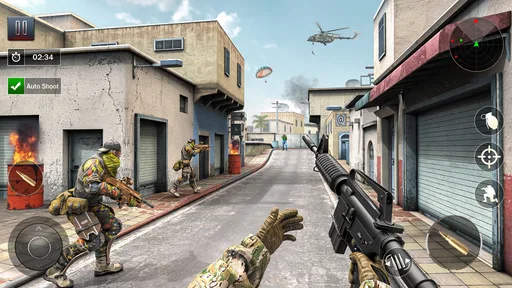
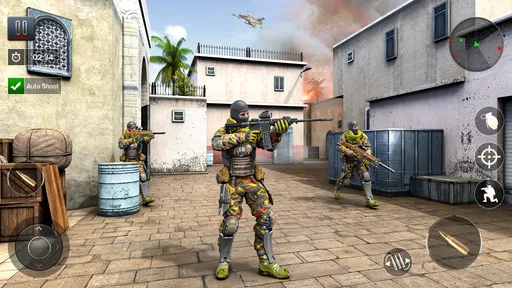
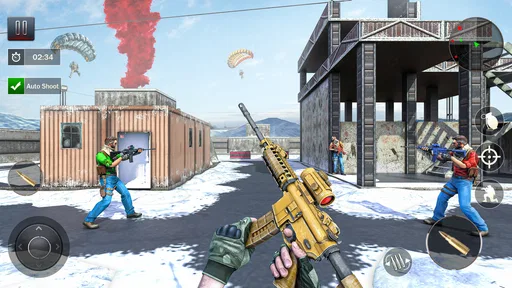
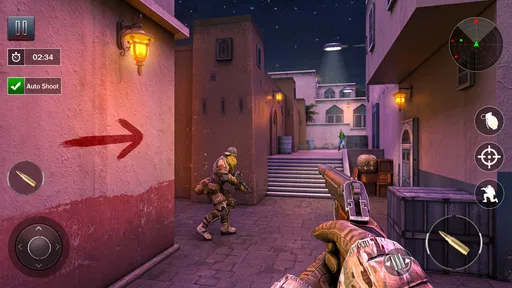
 Analysis by AppCompare
I think FPS Commando Shooting Games makes the most sense as a quick, pick-up-and-play action game rather than a shooter to organize a whole evening around. That distinction matters when a phone or tablet is shared at home: one person can take a short turn, then hand it over without needing everyone to follow a long story together. It is an adventure game from Hazel Mobile Games, free to install, and aimed at players who want a commando-style shooting experience on a mobile screen.
When a shared device changes the experience
Picture a quiet stretch after dinner: one person has a few minutes before leaving the table, another is waiting for a turn with the family tablet, and nobody wants to set up a console session. A short burst of mobile action can fit that gap. I’d treat this game as something each person can try in turn, rather than assume progress, settings, or a match will automatically suit everyone who picks up the device.
That small distinction makes shared use easier. Before handing the device over, I’d check that the next player is ready for a shooter and that the volume is comfortable for the room. If someone is in the middle of a mission or match, agree on a natural stopping point instead of grabbing the device mid-action. It’s a simple courtesy, but it avoids turning a casual game into a household argument about whose turn it is.
Make a few boundaries before playing
Free to install does not mean every part of a game is automatically free. This title has optional in-app purchases, with individual items priced from $0.99 to $199.99, so I’d set a clear spending boundary before letting anyone else use a device with a payment method attached. If purchases are not part of the plan, make sure the device’s usual purchase safeguards are in place rather than relying on a child or guest to guess what a button will do.
I’d also keep account boundaries practical. A shared phone can hold personal messages, saved payment details, and other apps that have nothing to do with gaming. Handing someone the device for a round is not the same as giving them access to an account, so use the device’s normal guest or screen-pinning tools where available. Those are general device habits, not special controls built into this game.
Another useful boundary is time. A shooter can make “one more mission” tempting, particularly when a player is close to finishing a task. I’d agree on a rough play window before starting, especially on a school night or when the battery needs to last for calls and messages later. That is more reliable than expecting the game itself to manage the household schedule.
A Thrilling Dive into Action
Right off the bat, FPS Commando Shooting Games throws you into the heat of battle. It's like being in your very own action movie, with you as the star commando taking on the bad guys. The graphics are surprisingly good for a mobile game, with detailed environments and realistic character models. You really get the feeling of being in a high-stakes mission with every level you conquer.
Worth Reading Before You Choose

Baby Panda World Brings Quick Play to Modern Phones, but Its Game Library Feels Busy

ESPN’s Live Game View Makes Following Close Games Easier

QuizzLand Review: A Good Fit for Short Trivia Breaks, Not Every Player

Basketball Stars: Multiplayer Is Fast, but Can It Recover When Matches Go Wrong?

WEBTOON Turns Phone Updates Into a Better Reading Routine

Link to Windows Runs on Shared Habits, Not Social Feeds
Gameplay and Controls
The gameplay is where this app truly shines. The controls are intuitive, designed to make it easy for both seasoned gamers and newcomers to jump right in. With a few swipes and taps, you’re aiming and shooting like a pro. It’s all about strategy and quick reflexes, and trust me, you’ll be on the edge of your seat as you navigate through enemy territories.
Each mission presents a unique challenge, whether it’s rescuing hostages or defusing bombs. The variety keeps things fresh and engaging, making you want to keep playing "just one more level."
Coordinate turns, not just tactics
For a group using one device, coordination matters as much as aiming. I’d let a player finish the current mission before passing the phone along, then give the next person a moment to get comfortable with the controls. That is especially helpful if one player is used to touch shooters and another is new to them. A quick reminder about the aim and fire controls can make a first turn less frustrating without taking over the game.
The store summary describes offline shooting, which makes the game an appealing option to consider for situations where a connection may be unreliable. I would still distinguish that from multiplayer: the original review describes multiplayer competition, and playing against other people naturally calls for connectivity. If you are planning a commute or a trip, it’s sensible to check what works before leaving, rather than assume every mode behaves the same way offline.
That distinction also helps set expectations for shared play. A person looking for a quick solo session may value the offline angle, while friends who want to compete together should plan around the multiplayer experience instead. If the group’s main goal is cooperative play in the same room, this may not be the best match; a game built specifically around local co-op would be a clearer fit.
Weapons and Upgrades
What’s a commando game without some serious firepower? This game offers a wide array of weapons, from classic assault rifles to high-tech sniper rifles. As you progress, you can upgrade your arsenal, adding scopes, silencers, and other enhancements to better tackle tougher foes. This progression system is incredibly satisfying, as you feel your character becoming more formidable with each upgrade.
One practical way to approach upgrades is to think about the kind of play that feels comfortable on a touchscreen. If you prefer dealing with threats at a distance, a weapon setup that supports careful aiming may suit you better than simply chasing the largest-sounding option. If you tend to move quickly and fire in close encounters, a different choice may feel more natural. The useful question is not only “What can I unlock?” but “Which tool makes the next mission easier for me?”
I’d also avoid spending impulsively just because a tougher section makes an upgrade look urgent. Try the current loadout first and notice what is actually causing trouble: missed shots, poor timing, or difficulty handling a particular encounter. That small pause can help separate a genuine progression need from a moment of frustration, and it matters more in a free game with optional purchases.
Multiplayer Mode
If you’re like me and enjoy some friendly competition, the multiplayer mode is where the real fun begins. You can team up with friends or face off against players from around the world. The matches are fast-paced and thrilling, testing your skills and strategy against real opponents. It’s a great way to showcase your commando prowess and climb the leaderboards.
For household use, multiplayer is best treated as a separate kind of session from passing the device around for solo missions. A shared screen does not necessarily mean everyone can join the same match, so I would not plan a family tournament around that assumption. If friends are playing from their own devices, agree on when to meet and whether everyone is comfortable with a competitive match before launching into one.
There is a trade-off between quick access and a fair contest. A player who has spent more time learning the controls or improving equipment may have an advantage over someone who has just started. For a relaxed group, taking turns in solo play can be more welcoming; for players who enjoy testing their reflexes against others, multiplayer gives a stronger reason to keep practicing.
Sound and Visuals
The sound design is top-notch, adding to the immersive experience. The gunfire, explosions, and background music all contribute to the adrenaline-pumping atmosphere. Visually, the game impresses with its detailed environments and smooth animations, making each mission feel dynamic and alive.
That energetic presentation is a plus when you want an absorbing action session, but it can be a poor fit in a quiet room or late at night. I’d lower the volume or use headphones when other people are nearby, and check that the player can still hear what is happening around them. The sound is part of the appeal, yet a household game should not drown out conversation or disturb someone who is trying to rest.
Age, trust, and who should play
The game is rated Teen, so I would not treat it as a default choice for every child simply because it is easy to download. A parent or guardian should decide whether its shooting and combat themes are appropriate for the particular young person. It can be a reasonable fit for teens who already enjoy action games and can follow agreed limits around playtime and purchases, but younger players may be better served by a less combat-focused game.
Its popularity may reassure some players that it has found a broad audience: it has a 4.3 average from around 443,000 ratings and more than 100 million installs. Those figures are context, not a guarantee that every player will enjoy the controls, tone, or spending choices. I’d use them as a reason to take a closer look, not as a substitute for deciding whether a shooter is right for the person using the device.
For adults and teens who want quick missions, weapon progression, and competitive play, it has a clear appeal. I’d steer away from it if you dislike first-person combat, want a calm puzzle experience, or need a game designed around local co-op. Players who prefer a deep narrative or a carefully paced single-player campaign may also find that a different adventure game suits them better.
In-Game Purchases and Ads
Now, let’s talk about the not-so-glamorous side: in-game purchases and ads. Like many free-to-play games, FPS Commando Shooting Games includes ads, but they’re not overly intrusive. The option to make in-game purchases is there, primarily for cosmetic items or to speed up progress. It’s all about personal preference here, as the game is definitely enjoyable without spending a dime.
For a shared device, I would be especially cautious about the difference between an optional purchase and a quick tap made by someone who does not realize it costs money. The listed purchase range runs from $0.99 to $199.99 per item, so the upper end is substantial. I’d keep purchases behind the device’s normal confirmation settings and explain that game currency or upgrades are not automatically included with a free install.
The game was released on March 9, 2020, and its current version is 16.1.1. It requires Android 6.0 or later, which is useful to know when deciding whether an older household phone can run it. If you are considering it for a particular device, check that device’s operating system before planning a shared session; compatibility is a more practical question than assuming a game will work on every phone in the drawer.
How it fits beside other mobile shooters
Compared with more elaborate mobile shooters that put long-term team coordination or a detailed campaign at the center, this one is easier to approach as a series of direct commando missions. That straightforwardness can be a strength when you want action without turning a short break into homework. It also means players who care most about deep tactical planning, a strong story, or a social experience built around a regular squad may find another shooter more rewarding.
It also occupies a different space from casual arcade games. The combat theme and first-person viewpoint ask for more attention than a simple tap-to-pass-time title, so I would not choose it when someone needs a game they can play while barely watching the screen. On the other hand, it can be more immediately involving than a slow strategy game when you have only a brief window and want something active.
My practical advice is to decide what you want before installing: quick solo action, a chance to improve your aim, or competitive matches. If your priority is offline play, focus on the solo side and verify it while connected before relying on it away from home. If you want a shared living-room activity, choose something whose local multiplayer is explicit rather than assuming online competition will translate into a group session on one device.
Final Thoughts
All in all, FPS Commando Shooting Games is a fantastic addition to the world of mobile shooters. It combines thrilling gameplay, strategic depth, and a competitive multiplayer mode to create an experience that’s hard to put down. Whether you’re a casual player or a hardcore gamer, there’s something here for everyone. So, if you’re ready to channel your inner commando, gear up and jump into the action!
And if you're itching to start your adventure, you can easily find the download links on our website. Happy gaming, and may your aim always be true!
My household verdict
I’d recommend giving it a try if you enjoy mobile shooting, have a compatible Android device, and are happy to keep spending and playtime boundaries clear. It is free to install, but optional purchases and ads mean I would not hand it to a younger family member without first checking the device’s purchase settings and deciding whether the Teen-rated combat suits them.
Pros
- Smooth graphics enhance gameplay experience.
- Wide variety of weapons to choose from.
- Intuitive controls suitable for all players.
- Engaging missions keep you entertained.
- Frequent updates with new content.
Cons
- Occasional ads disrupt gaming flow.
- Requires internet for some features.
- Might drain battery quickly on older devices.
- In-app purchases can be expensive.
- Some levels may feel repetitive.
FAQs for FPS Commando Shooting Games
What are the system requirements for FPS Commando Shooting Games?
FPS Commando Shooting Games typically require a device running Android 5.0 or iOS 11 and above. For optimal performance, a smartphone or tablet with at least 3GB of RAM and a quad-core processor is recommended. Ensure you have around 500MB of free storage space to accommodate the game and future updates.
Is an internet connection required to play FPS Commando Shooting Games?
While FPS Commando Shooting Games offer offline modes for solo play, an internet connection is required for accessing multiplayer features and online leaderboards. Connecting to Wi-Fi is recommended to avoid excessive data usage, especially when downloading updates or engaging in multiplayer battles.
Are there in-app purchases in FPS Commando Shooting Games?
Yes, FPS Commando Shooting Games include in-app purchases that allow players to buy additional weapons, skins, and other enhancements. While the game can be enjoyed without spending money, these purchases can enhance gameplay and provide a competitive edge in multiplayer modes.
How does FPS Commando Shooting Games handle ads?
The game features ads that appear between levels or after completing certain missions. Players can opt to purchase an ad-free version through in-app purchases. Additionally, watching ads can occasionally reward you with in-game currency or bonuses, providing a strategic advantage.
Is FPS Commando Shooting Games suitable for all ages?
FPS Commando Shooting Games is rated for mature audiences due to its realistic violence and intense gameplay. It is recommended for players aged 16 and above. Parents should consider the content and decide if it aligns with their preferences and their child's maturity level before downloading.


